Drive C Penuh Padahal Aplikasi Sedikit? Ini 2 Cara Simpel Mengatasinya
Pasti banyak yang sebel jika ingin menginstall aplikasi tetapi partition atau Drive C sudah full, padahal koleksi aplikasi kamu masih sedikit. Itu dikarenakan berkas sisa aplikasi yang kamu buka menumpuk dan tidak pernah dihapus. File itu yang membuat drive C menjadi full.
Lalu bagaimana solusinya? Nih, simak ulasan cara mengatasinya dengan simpel.
1. Hapus berkas di folder Prefetch
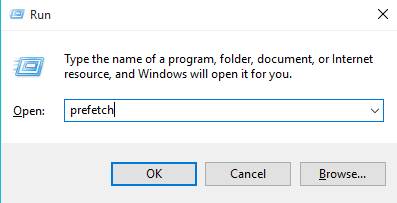
Saldi Masuk ke tampilan seperti gambar di atas dengan cara tekan tombol Windows + R lalu ketik Prefetch seperti gambar di atas lalu tekan OK.
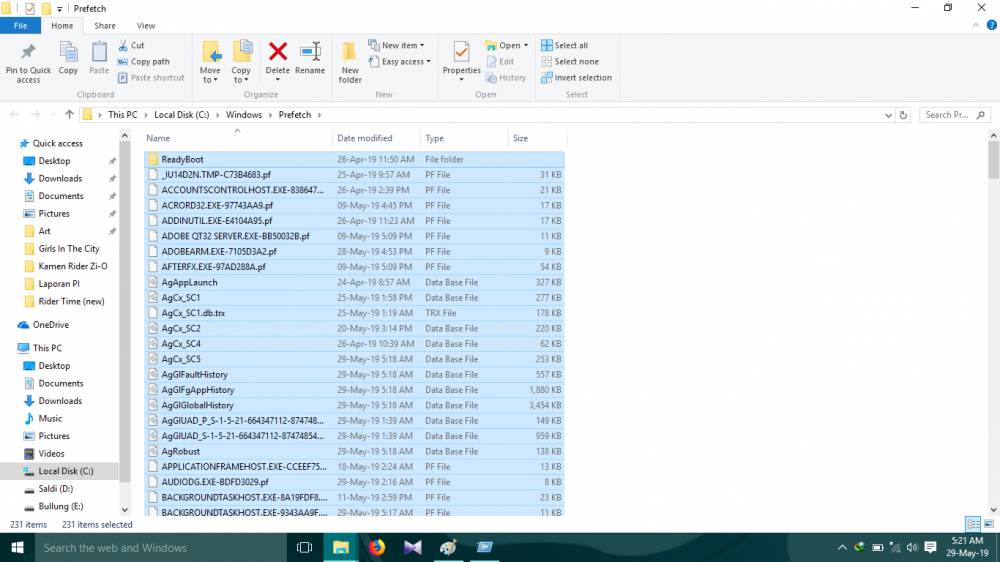
Saldi Setelah muncul tampilan di atas, kamu tinggal menghapusnya dengan cara tekan tombol Ctrl + A untuk memblok semua file, kemudian Ctrl + D lalu Delete. Alasan kenapa harus di tekan tombol Ctrl + D lalu Delete, yaitu supaya file yang terhapus tidak muncul ke recycle bin. Jadi kamu nggak perlu kerja 2 kali untuk menghapusnya. Tampilan di atas merupakan berkas sisa aplikasi yang telah kamu pakai, berkas itulah yang membuat pertition C jadi full.
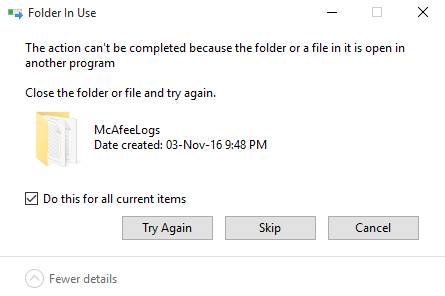
Saldi Jika muncul tampilan seperti di atas, kalian tinggal centang Do this for all current items lalu tekan Skip.
2. Hapus berkas di folder Temp
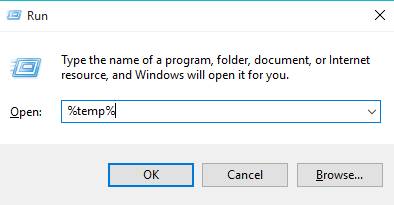
saldi Caranya hampir sama, tinggal tekan Windows + R lalu ketik %temp% lalu tekan OK. Ingat yah kamu harus ketik %temp%, bukan temp. Harus ada tanda %, karena kalau kamu salah ketik maka akan masuk ke folder sistem, bukan ke folder cache.
Dan setelah masuk ke folder temp, caranya hampir sama yang di atas. Kamu tinggal tekan tombol Ctrl + A untuk memblok semua file, kemudian tekan tombol Ctrl + D lalu Delete. Nah, sekarang periksa pastition C, pasti udah gak full.